Rigging To Dinosaurs' Skeleton
If you use the skeleton of a base-game dinosaur, you have the option of using that dinosaur's animations on your creature. This means you won't have to animate your creature at all. We highly recommend using the skeleton of a base-game dinosaur, as it ensures your creature will work with all our systems.
If you want to create your own animations and don't care about using our skeletons, please ensure that your skeleton has the following bones:
- A ref/root bone placed at
(0,0,0)with no rotation that connects directly to the Pelvis bone, with no other children. See base game dinosaur skeletons for an example for how this is set up. - Maximum Bones:
255(if possible, aim for 75 or less) - A Jaw bone (will be used to pick up items)
Rigging Your Creature to a Base Game Dinosaur Skeleton
Before starting, it is highly recommended to rig your dinosaur to our existing skeleton templates so you use our animations for your creature, and take advantage of Inverse Kinematics (IK). If you do not wish to use our animations, you can skip this and simply use your own skeleton, just be sure that your creature has a ref/root bone (as is required for all video game animations). More information about ref/root bones can be found here.
- Look through our currently made dinosaurs and identify the dinosaur that most closely resembles the creature you are looking to implement.
Example: if you are going to mod in a Tarbosaurus, you should use the Daspletosaurus Skeleton (both have a theropod body shape, two fingers, and three toes).
Example 2: if you are going to mod in a Parasaurolophus you would want to use the Lambeosaurus Skeleton (both have 4 legs, with the front legs having 1 toe and the back legs having 3 toes).
Once you have selected the most similar dinosaur, right click on the Dinosaur's Skeletal Mesh (it's pink with the name
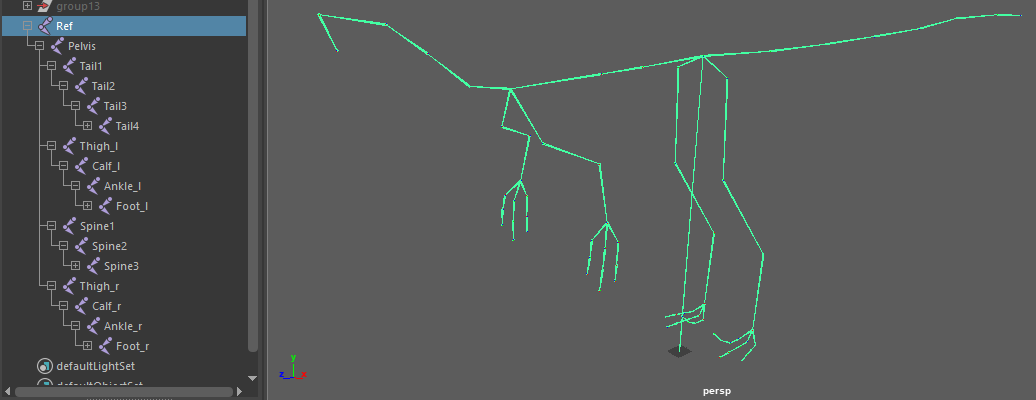
SK_DinosaurName) and export it from the editor. When exporting, make sure to uncheck "Export LODS".Import the mesh into your 3D modelling program and delete the mesh so only the bones remain. These are the bones you will want to rig your dinosaur to.
Ideally you should try not to move the bones around if you want to get perfect animation transfers when base-game dino retargeting animations. However, you can definitely move them around a bit and the results won't be too bad.
Using your own Skeleton
If you have already rigged your dinosaur, and it follows the same layout as our general skeleton, you can simply rename the bones to match the bones on the imported skeleton.
If you have a skeleton structure fundamentally different from our skeleton template, you should re-rig your character to follow our structure, otherwise our animations won’t easily copy over to work on your skeleton, and you will likely have problems with Terrain Alignment and physics/combat hitboxes.
Common Skeleton Problems
BEFORE animating your creature, IMPORT your skeleton into the Dev Kit and see how the bones are imported! Ensure your skeleton does not have any of the following problems.
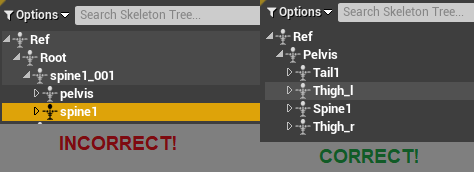
1. Incorrect Bone Layout
Ensure your imported skeleton has a similar layout shown below. Do not have multiple Root bones. Every part of the body should be parented to the Pelvis bone. Feet should not be attached to a separate IK bone.
2. Leaf Bones
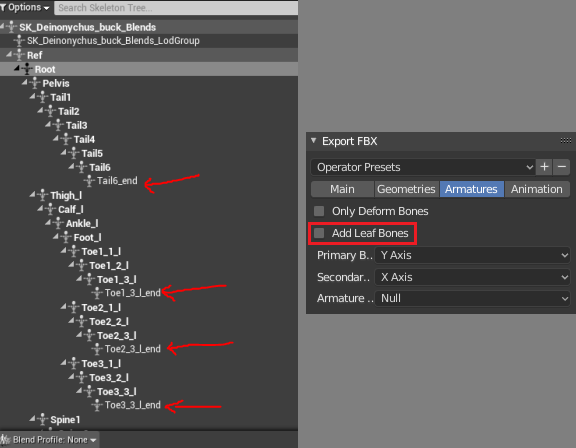
Blender usually creates hundreds of extra "Leaf" bones, which are useless. The option below needs to be disabled when exporting your skeleton out of Blender as an FBX.